11 Best Org Chart Software Tools in 2026: Compared by Use Case
Compare 11 org chart software tools by use case: Microsoft 365 org charts, HRIS-connected charting, free diagrams, and workforce planning, with pricing, limitations, and a demo checklist.
The best org chart software depends on what you need the chart to do. An employee looking for a colleague, an HR administrator publishing reporting lines, and a leadership team planning a restructure need different capabilities.
For Microsoft 365 organizations that want a live org chart and employee directory, our recommendation is OneDirectory. For HRIS-connected charting, start with OrgChart. For spreadsheet-based organizational charts, consider Organimi. For collaborative diagramming, consider Lucidchart or Visio. For headcount planning and organizational design, evaluate ChartHop, Orgvue, or Ingentis.
The comparison below explains those recommendations, where each tool fits, and what to check before buying.
In this guide
- Best org chart software at a glance
- Which type of org chart software do you need?
- How we evaluated the software
- 1. OneDirectory
- 2. OrgChart
- 3. Organimi
- 4. Workleap Pingboard
- 5. Lucidchart
- 6. Microsoft Visio
- 7. Miro
- 8. draw.io
- 9. ChartHop
- 10. Orgvue
- 11. Ingentis org.manager
- Automatic sync, data refresh, and import: what is the difference?
- How to choose org chart software without overbuying
- A practical demo checklist: seven changes every finalist should handle
- When your existing HR system may be enough
- Frequently asked questions
- Choose the tool that solves your organization's actual problem
Best org chart software at a glance
The order groups products by their primary use case. It does not imply that an employee directory outperforms a workforce-planning platform at workforce planning.
| Software | Our recommended use case | Data and maintenance approach | Pricing basis or published starting point |
|---|---|---|---|
| OneDirectory | Microsoft 365 org chart and employee directory | Automatic Entra ID sync | Pro from $349/month for up to 250 profiles; annual billing available |
| OrgChart | Dedicated HRIS-connected organizational charts | HR, ATS, and payroll connectors; automatic refresh | Core from $105/month for 100 employees charted, billed annually |
| Organimi | Dedicated charting from spreadsheets and connected sources | CSV/Excel import; connectors on Premium | Based on people charted, plan, and billing term |
| Workleap Pingboard | Org chart and directory within an employee experience platform | Live chart and platform integrations | Workleap Standard from $4,999 with annual billing; confirm scope |
| Lucidchart | Org charts alongside other business diagrams | Manual editing, imported data, and Enterprise data-refresh workflows | Free and paid tiers; verify the required data features |
| Microsoft Visio | Microsoft-based diagram creation and data-driven charts | Drawing and data-based generation; capabilities vary by edition | Basic version included in eligible Microsoft 365 plans; paid plans available |
| Miro | Collaborative org design workshops | Org chart widget with CSV import and re-import | Free and paid plans |
| draw.io | Free organizational diagrams | Diagram files you maintain | Core online and desktop tools are free |
| ChartHop | People analytics and headcount planning | Connected people and business data | Proposal-based; depends on team and modules |
| Orgvue | Organizational design and restructuring scenarios | Combined workforce data and scenario modeling | Contact vendor for a proposal |
| Ingentis org.manager | Configurable organizational visualization and HR analysis | Source-generated charts; features depend on version and extensions | Contact vendor for a proposal |
Pricing entries describe different purchasing units and should not be compared as equivalent packages. USD amounts are marked with $. Taxes, implementation, extra integrations, and optional modules may add cost. Source links and important plan restrictions appear in the individual reviews.
Which type of org chart software do you need?
Org chart software represents an organization's reporting relationships. Some products also provide employee profiles, data synchronization, position management, analytics, or planning tools.
Before comparing vendors, choose the job you need to accomplish.
A live employee org chart
Choose this category when employees need to find people, understand reporting lines, and navigate teams throughout the working week. The important questions are whether the chart stays current, whether people can find it easily, and whether its profiles contain useful information.
A chart can look excellent in a presentation and still be awkward for everyday employee lookup.
A diagram you can share
Choose a diagramming tool when you need a board presentation, project structure, departmental snapshot, or document illustration. Layout control, collaboration, and export quality may matter more than continuous synchronization.
Some diagramming products also support imports and connected data. Evaluate the specific workflow rather than assuming every diagram must be redrawn by hand.
A model of tomorrow's organization
Choose an organizational design or planning platform when you need to compare structures, vacancies, headcount, costs, or future scenarios. Ask how the product separates proposed changes from the approved organization.
An interactive chart of current employees is not, by itself, evidence of a complete planning workflow.
An org chart inside your existing HR platform
If your organization already uses an HCM or HRIS with an org chart, evaluate that feature before purchasing another system. A separate product becomes useful when the existing chart leaves a specific gap: employee access, navigation, publishing, cross-system visibility, or planning.
For the difference between hierarchy and people discovery, see our guide to org charts versus employee directories.
How we evaluated the software
We selected tools covering employee lookup, dedicated charting, general diagramming, and organizational planning. This is a shortlist across those needs, not an exhaustive directory of every product with an org chart feature.
Our recommendations consider five purchasing questions:
- Purpose: Is the product primarily for employee lookup, chart publication, collaboration, or planning?
- Maintenance: Does it use manual edits, file replacement, connected-data refresh, or automatic synchronization?
- Structure: Can the required plan represent reporting relationships, positions, and organizational complexity?
- Access: How will employees, administrators, and leadership teams use it?
- Cost: What unit is billed, and which capabilities require a different plan or module?
We link to official sources so you can inspect the underlying features and restrictions. We do not assign numerical scores without measured tests, repeat unverified implementation-time claims, or treat a full HR platform's review rating as an org-chart-specific rating.
For any finalist, validate the current plan against your own data and security requirements. A documented feature is useful evidence, but it does not establish how well your particular configuration will work.
1. OneDirectory
Our pick for Microsoft 365 organizations needing a live org chart and employee directory.
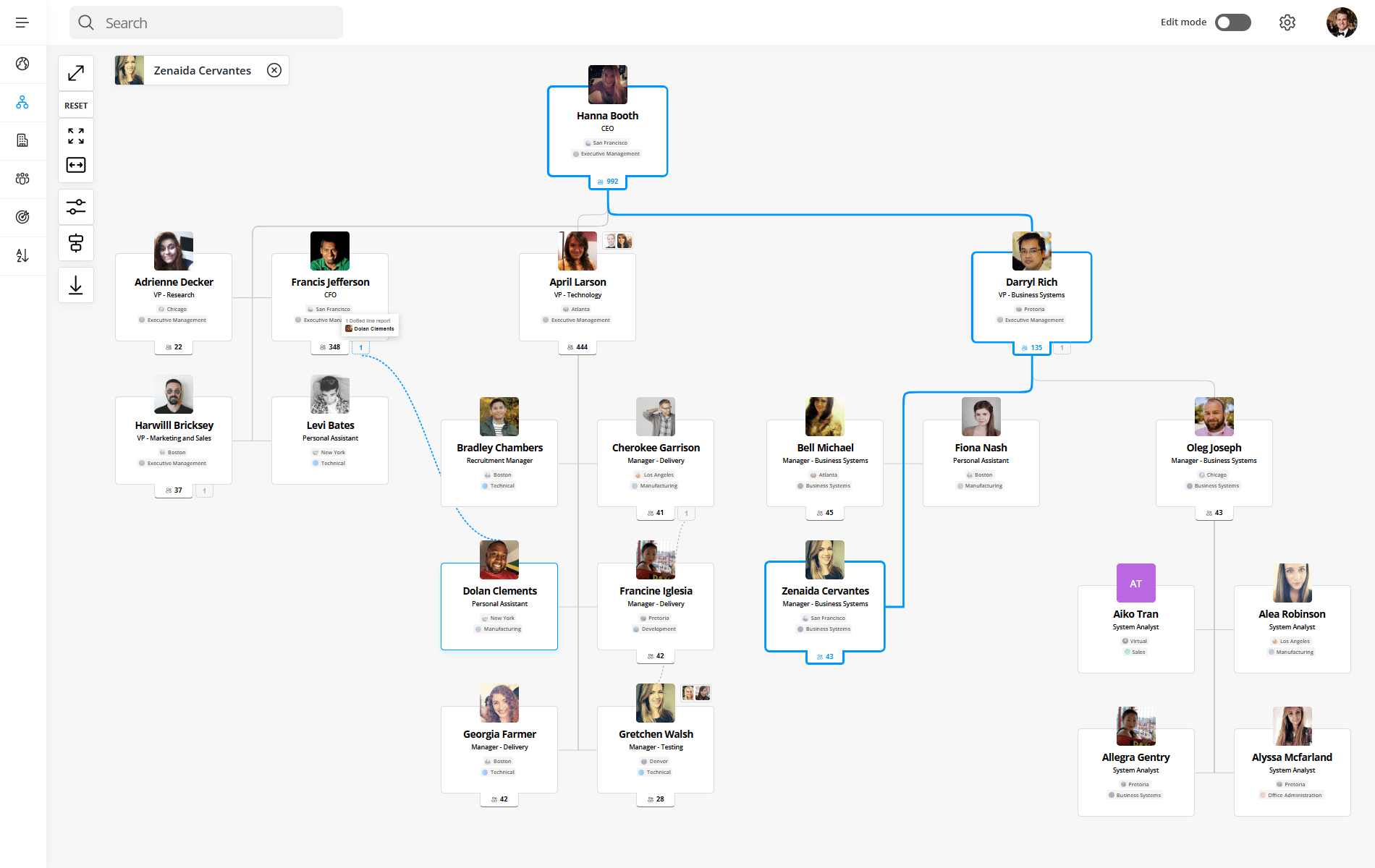
OneDirectory builds an interactive org chart from Microsoft Entra ID data. Employees can search for colleagues, explore reporting lines, and move between the chart and directory. Its value is strongest when the chart is part of everyday people discovery rather than an occasional slide.
The org chart product page documents expandable branches, alternative layouts, chain-of-command highlighting, and PNG/SVG exports. The pricing page lists dotted-line relationships, assistants, organizational units, and one-way Microsoft 365 synchronization.
Why shortlist it: A connected chart and directory reduce the need to maintain separate employee lookup experiences.
Main limitation: Start with your Microsoft 365 data quality. Missing or incorrect manager relationships need attention upstream. For compensation modeling or detailed restructuring scenarios, evaluate a planning platform separately.
Pricing: Pro costs $349/month for up to 250 profiles, $649 for 251–500, $999 for 501–1,000, and $1,599 for 1,001–2,000. Annual options and custom Enterprise pricing are available. The trial lasts 14 days. Confirm multi-tenant scope and additional fees for your deployment.
What to validate: Change one manager relationship in a test environment and confirm how it appears after synchronization. Then ask an ordinary employee to find that person's team.
A documented customer example
In OneDirectory's BPM customer story, the accounting and advisory firm describes replacing SharePoint's built-in people search with a directory and org chart serving more than 1,200 colleagues. Its stated needs included finding people, expertise, offices, and reporting relationships across the firm.
This illustrates a people-discovery use case. It is a vendor-published customer account, not a comparative performance test or a measured claim about time saved.
2. OrgChart
Our pick for dedicated organizational charts connected to HR systems.
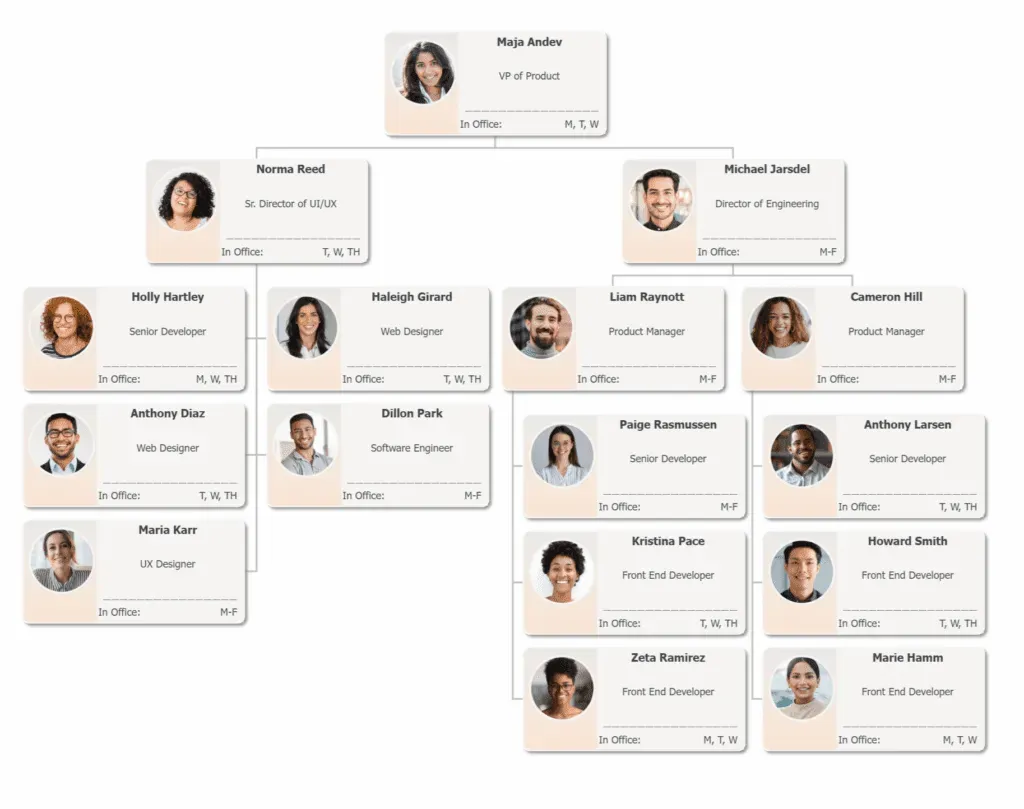
OrgChart is worth evaluating when HR owns the employee data and needs dedicated charting rather than a general drawing canvas. Its plan comparison lists automatic refresh through HR, ATS, and payroll integrations, along with searchable charts and multiple export formats.
Why shortlist it: It combines data-connected charting with progressively deeper structural and planning capabilities.
Main limitation: Those capabilities are tiered. Matrix and position-based views appear in Plus; workforce planning appears in Pro. Integration allowances also vary.
Pricing: For 100 employees charted, published starting prices are $105/month for Core, $157 for Plus, and $263 for Pro, all billed annually. Costs increase with employees charted; obtain a quote for your actual population.
What to validate: Ask the vendor to refresh a manager change from your proposed source system and show the exact plan required for your chart views.
3. Organimi
Our pick for dedicated org chart creation from spreadsheets and connected data.
Organimi offers a more focused charting workflow than a general-purpose diagram editor. Its pricing and packages page lists CSV/Excel import on Basic, with matrix and governance charts, SSO, and Organimi Connect on Premium. Enterprise adds API access.
Why shortlist it: Buyers can start with spreadsheet-fed charts and evaluate connections as their maintenance needs grow.
Main limitation: Do not assume that the lowest-priced plan includes matrix relationships, integrations, or your preferred hosting region. The published plan differences matter.
Pricing: Costs vary with people charted and billing term. Because the page uses an interactive headcount selector, confirm the selected population before recording a price. A 14-day Premium trial is advertised.
What to validate: Import a representative spreadsheet, test a reporting change, and compare the file-update workflow with the connector you would use in production.
4. Workleap Pingboard
Our pick for org charts within a broader employee experience platform.
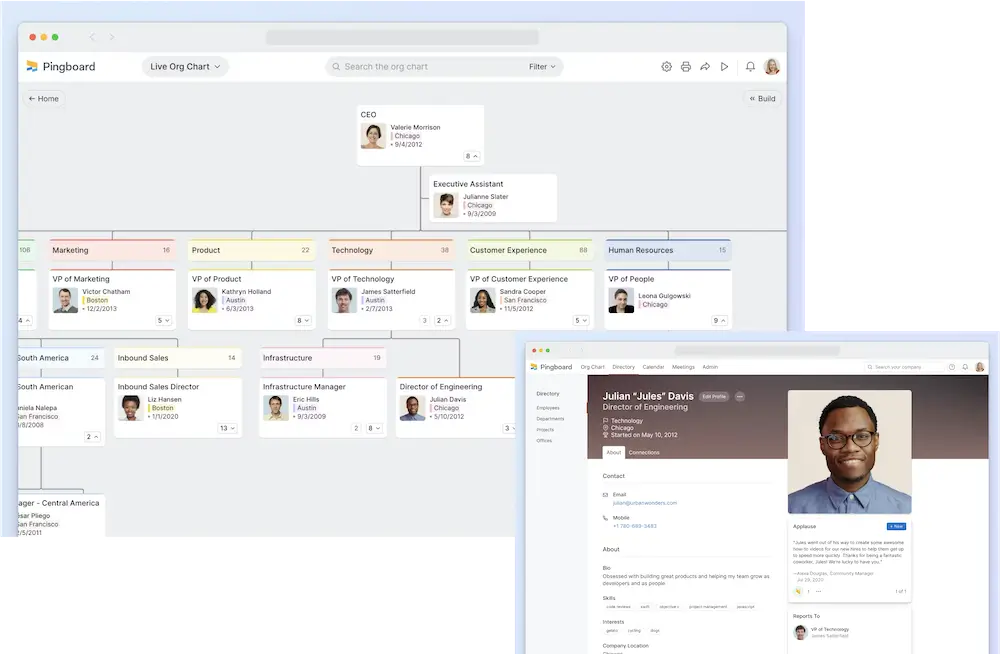
Pingboard's org chart and employee directory are now part of Workleap. The official product page and chart documentation describe its charting experience and drag-and-drop editing.
Why shortlist it: It is a relevant option when your organization also wants Workleap's engagement and performance capabilities.
Main limitation: Evaluate the current Workleap offering rather than relying on historical standalone Pingboard prices or reviews.
Pricing: The current Workleap pricing page shows Standard starting at $4,999 and Pro at $11,999, with annual billing. Organizations above 250 employees are directed to Enterprise pricing. Ask which population, integrations, and services the proposal covers.
What to validate: Check employee access, the source-data connection, and the chart's role in your intended Workleap deployment.
5. Lucidchart
Our pick for org charts alongside other business diagrams.
Lucidchart makes sense when your team needs organizational diagrams as well as other visual documentation. Its org charts can be created from data, not just drawn manually.
Lucid's refresh documentation lists Enterprise-only dataset refresh, replacement, and overlay workflows. It describes linked Google Sheets and Microsoft 365 sources, including automatic reflection of changes when Microsoft 365 Excel two-way sync is enabled.
Why shortlist it: Diagramming flexibility with documented data-maintenance options.
Main limitation: Check plan eligibility and source compatibility carefully. File import, linked refresh, and enabled two-way sync are different workflows.
Pricing: Consult the current pricing page and request the tier that supports your required data workflow.
What to validate: Change a manager and add an employee in the connected source. Confirm what updates automatically, what needs refresh, and what happens to manual diagram edits.
6. Microsoft Visio
Our pick for Microsoft-based diagram creation and data-driven organizational charts.
Visio is a relevant first check if your organization already licenses Microsoft tools and primarily needs diagrams. Microsoft's edition comparison distinguishes basic Microsoft 365 functionality from paid capabilities.
Microsoft also documents generating organizational charts from employee data. It is inaccurate to describe every Visio chart as a manually drawn picture.
Why shortlist it: A diagramming option within a familiar Microsoft environment.
Main limitation: An included Visio web app is not equivalent to every paid edition. Confirm the exact data, employee-field, and sharing capabilities you need.
Pricing: Basic Visio is included in eligible Microsoft 365 commercial plans. On the Irish pricing page, Plan 1 is €4.30/user/month and Plan 2 €13/user/month, paid yearly, excluding VAT. Regional prices differ.
What to validate: Reproduce your required import and update workflow in the edition you actually own or plan to buy.
7. Miro
Our pick for collaborative org design workshops.
Miro suits teams that want to discuss structures together on a shared canvas. Its org chart widget documentation describes CSV import, updates through new CSV uploads, drag-and-drop reassignment, automatic layout, hiring indicators, and CSV export. The widget is available on all plans.
Why shortlist it: The chart can sit alongside workshop notes, proposals, and feedback.
Main limitation: The documented CSV-update workflow does not itself establish continuous synchronization with your HRIS. Confirm any additional integration separately.
Pricing: Miro offers free and paid plans; check board, sharing, and administrative requirements.
What to validate: Run a real planning session and test whether the agreed structure can be exported and handed back to the team responsible for production employee data.
8. draw.io
Our pick for free organizational diagrams.
draw.io, also known through diagrams.net, is a practical option when you need a diagram without buying a dedicated employee platform. The official site offers free online and desktop tools, local or connected storage, and exports including SVG, PNG, and PDF.
Why shortlist it: Low software cost and control over where diagram files are stored.
Main limitation: Decide who maintains the chart. A diagram file does not, by itself, establish an employee directory or an automated HR-data maintenance process.
Pricing: The core tools are free. Check any separately distributed integrations or organizational deployment requirements.
What to validate: Create the chart, share an editable copy, and ask someone else to make a reporting change. The usefulness of a free tool includes the time required to keep its output accurate.
9. ChartHop
Our pick for people analytics and headcount-planning workflows.
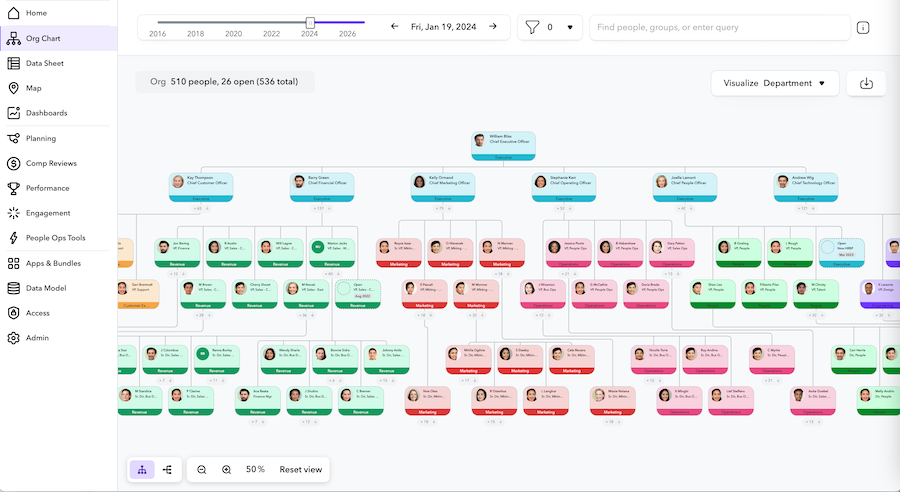
ChartHop's platform page describes connected people and business data, an interactive chart, employee profiles, and additional workflow modules covering areas such as headcount planning and compensation.
Why shortlist it: Relevant when HR and finance need to use organizational data for decisions beyond reporting-line lookup.
Main limitation: Specify the workflow modules you need. A platform demonstration can include capabilities beyond the proposed package.
Pricing: The current pricing page requests team size, requirements, and connections to prepare a proposal. Do not treat older per-employee figures as a current official quote.
What to validate: Bring a headcount request through the intended approval process and confirm how the resulting change is reflected in the organizational view.
10. Orgvue
Our pick for organizational design and restructuring scenarios.
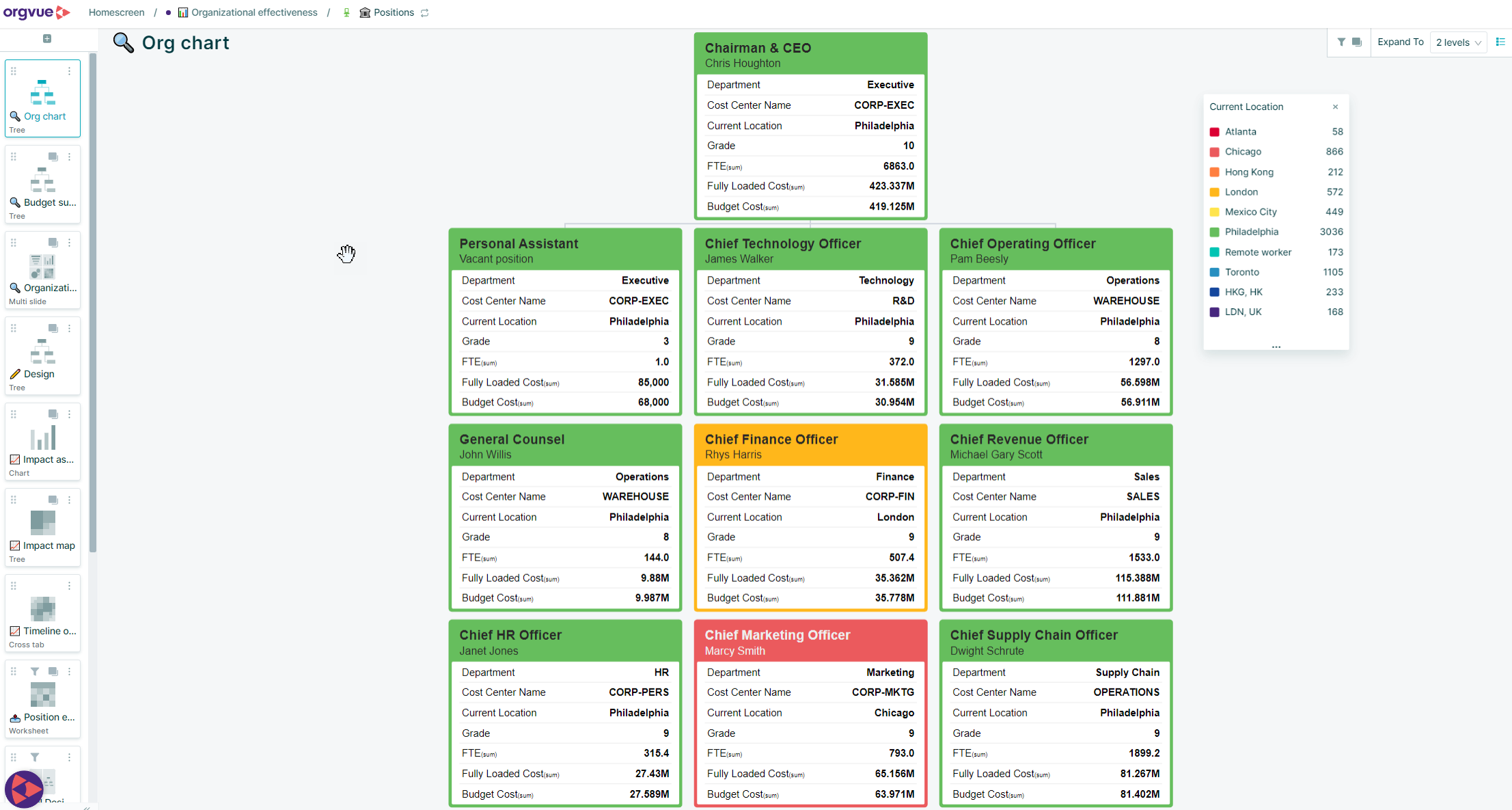
Orgvue is relevant when leadership needs to evaluate how a change in structure, location, skills, or cost affects the organization. Its organizational design page describes combined workforce data, scenario modeling, organizational analysis, and monitoring change.
Why shortlist it: It addresses decisions about the future organization rather than only displaying today's reporting lines.
Main limitation: Define the analysis you need and the people who will use it. A planning project may require different data, ownership, and implementation work from an employee directory rollout.
Pricing: Request a proposal for your intended deployment; no price is stated on the cited solution page.
What to validate: Ask for two alternative structures using representative data, then compare their costs and headcount before either scenario is adopted.
11. Ingentis org.manager
Our pick for configurable organizational visualization and HR analysis.
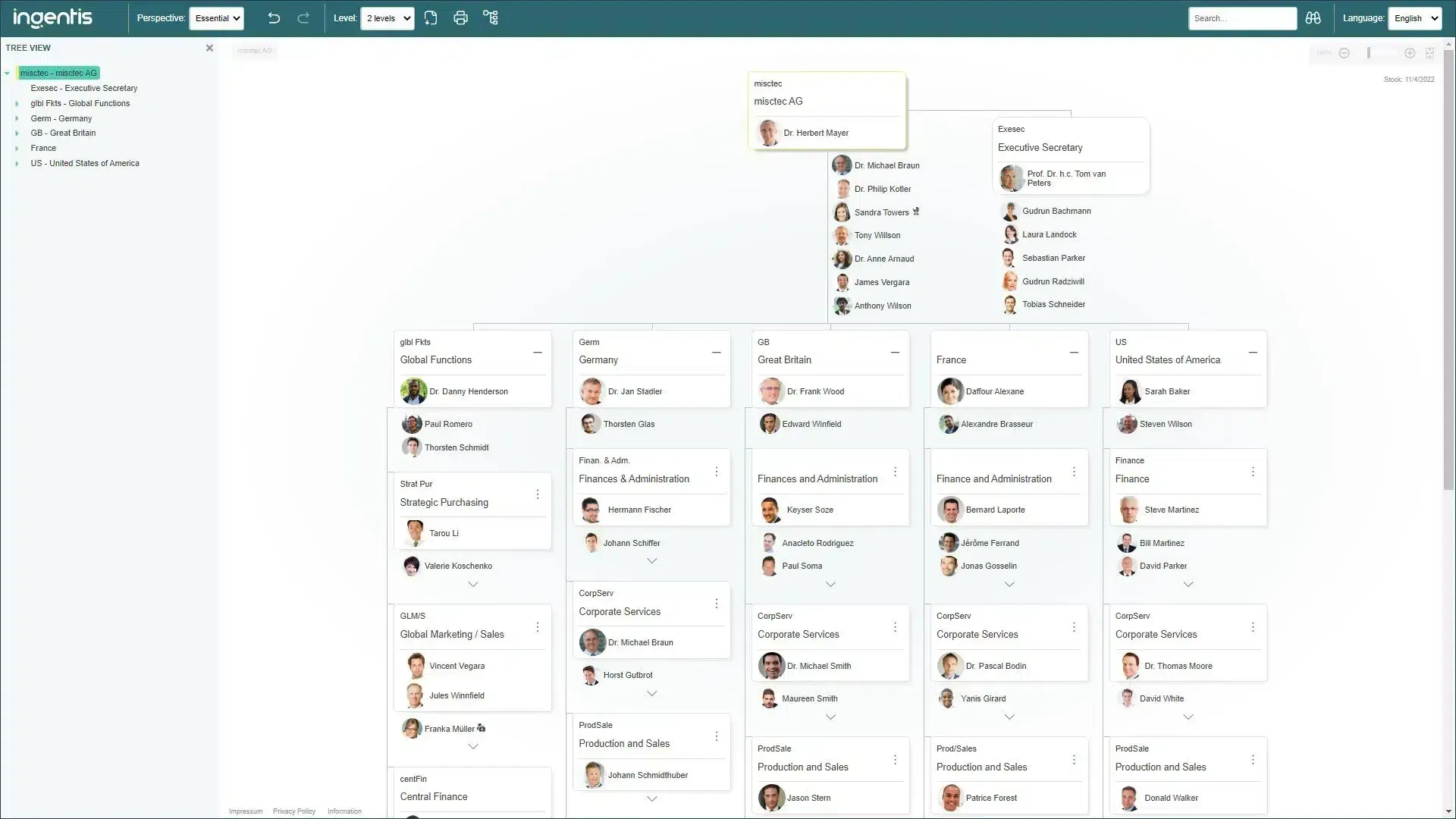
Ingentis org.manager is worth considering when you need charts generated from organizational data with configurable analytical views. Its version comparison describes source-generated browser charts in Essential, extra filtering and data-merging functions in Advanced, and HR metrics and further exports in Premium. Extensions cover additional analytics and design needs.
Why shortlist it: A range of configurations for charting and organizational analysis.
Main limitation: Confirm which version and extensions deliver the proposed solution. The platform name alone does not identify the included capabilities.
Pricing: Request a proposal; the cited version page does not publish a list price.
What to validate: Ask for a source-data update, a departmental analysis, and the output your stakeholders need, all using the configuration in the quote.
Automatic sync, data refresh, and import: what is the difference?
“Automatically generated” is not enough information to decide whether a chart will stay accurate. Ask what happens after the first chart exists.
| Maintenance method | What changes the chart | What to verify |
|---|---|---|
| Manual editing | Someone edits the diagram or employee record | Who owns updates and how changes are reported |
| File import or replacement | Someone uploads a new CSV or spreadsheet | Whether updates preserve layout, IDs, and local edits |
| Connected-data refresh | A refresh applies changes from a linked source | Whether refresh is manual or scheduled and which fields update |
| Automatic synchronization | A configured connection transfers source changes | Frequency, field mapping, failures, and account exclusions |
| Two-way synchronization | Changes can move between connected systems | Which fields and systems support it and how conflicts are resolved |
These are workflow distinctions, not a universal quality ranking. A periodic spreadsheet update may be entirely sufficient for a quarterly board chart. An employee-facing directory used throughout the day has a different maintenance requirement.
Also separate identity data from HR data. A chart reading Entra ID can only reflect reporting relationships that reach Entra ID. If your HRIS is authoritative, map the full path from the HR change to the employee-facing chart.
How to choose org chart software without overbuying
Start with the source of truth
Write down where each important field is maintained: employee ID, name, manager, job title, department, location, and employment status. Include contractors and subsidiaries if they belong in the chart.
Then check the connection for the particular product and plan. “Integrates with Microsoft 365” can mean sign-in, provisioning, embedded access, or organizational-data synchronization. Ask which one the vendor means.
Define the relationships you need to show
A direct-manager tree, a matrix chart, and a position hierarchy represent different things. Bring examples from your own organization: a vacant role, an assistant, a project reporting line, or a colleague with two forms of accountability.
Ask how each relationship is stored, updated, searched, and exported. A dotted connector drawn on a canvas may be adequate for a presentation; a maintained secondary relationship may be necessary for a live employee experience.
Test the employee experience separately from the admin experience
An administrator's ability to create a chart says little about whether colleagues will use it.
Give an ordinary employee three tasks: find a person, identify that person's manager, and explore the adjacent team. Observe where they hesitate. Then have an administrator update the source data and repeat the exercise.
Compare costs at your actual headcount
Use the same assumptions for every proposal: the people included, the people editing, the people viewing, required connections, contract term, and support needs.
For illustration, OneDirectory's published annual Pro prices are $6,990 for 251–500 profiles and $17,290 for 1,001–2,000 profiles. Those figures are not equivalent to a planning-suite quote or a diagram editor's seat price. See the current price bands and include applicable add-ons.
Request these figures from each finalist:
- Year-one total, including implementation and training.
- Recurring annual total for the exact required configuration.
- Cost at your next expected headcount band.
- Charges for extra sources, tenants, modules, or administrators.
- The renewal assumptions used in the proposal.
Verify access and security against your requirements
Ask who can view sensitive fields, edit records, share charts externally, and export data. Confirm the hosting region, authentication method, and relevant security documentation for the specific service you will deploy.
Do not equate hiding a field on a chart card with restricting access to the underlying data.
A practical demo checklist: seven changes every finalist should handle
Use representative synthetic data or an approved test dataset. This is a suggested buyer test, not a claim that we ran it across the products above.
| Test | Action to demonstrate | Evidence to record |
|---|---|---|
| New starter | Add an employee in the intended source | Steps taken, arrival time, and fields transferred |
| Manager change | Move an employee to another manager | Update method and whether the old relationship disappears |
| Leaver | Remove or disable an employee | Chart behavior and handling of that person's remaining reports |
| Missing manager | Leave a manager reference blank or invalid | Whether the issue is visible and how it is corrected |
| Secondary relationship | Add a relevant dotted-line or assistant relationship | Required plan, source, and export behavior |
| Restricted information | Compare employee and administrator views | Whether unauthorized users can retrieve or export the field |
| Publishing | Share the chart through your intended channel | Access requirements and whether the shared output stays current |
Record the exact product edition, connection, settings, and manual steps. A vendor completing a test with a different plan has not established that your quoted configuration can do the same thing.
When your existing HR system may be enough
Workday, SAP SuccessFactors, UKG, BambooHR, and other HR platforms may already provide the organizational view you need. Evaluate your licensed system's current capabilities before adding a second tool.
The useful question is whether it serves the audience and workflow you have defined. Can all relevant employees access it? Can they find people and teams easily? Does it show the relationships you need? Can administrators publish suitable views without exposing sensitive records?
If the existing system meets those requirements, keeping the chart there may be the simplest choice. If it does not, describe the specific gap before comparing dedicated alternatives. You do not need to replace payroll or core HR merely to improve organizational visibility.
Frequently asked questions
What is the best org chart software for Microsoft 365?
Our recommendation is OneDirectory for organizations seeking a live employee-facing chart and directory built around Entra ID. Visio is a relevant alternative for Microsoft-based diagram creation. Choose according to whether the primary job is everyday employee lookup or producing diagrams, then validate the required data-maintenance workflow.
What is the best free org chart software?
draw.io is our pick for a free organizational diagram. Miro's free offering is another option to investigate for collaborative work. Free diagram creation and a continuously maintained company directory are different requirements; check access, maintenance, and export limits before choosing.
Which org chart tools update automatically?
Several products support connected-data maintenance. What matters is the source, plan, fields, and update method. Ask the vendor to demonstrate a new hire, manager change, and leaver through your intended production connection. Do not infer continuous synchronization from the ability to generate a chart from a spreadsheet.
Can org chart software show dotted-line reporting?
Some tools can, but implementation differs. A drawn line, a separately maintained relationship, and a source-synchronized reporting relationship are not interchangeable. Confirm how secondary relationships behave in search, updates, permissions, and exports.
Do we need planning software as well as a live org chart?
Only if you have a planning requirement the current chart cannot meet. Employee lookup needs accurate present-day relationships. Restructuring may require future scenarios, position and vacancy data, cost comparisons, and approval workflows. Define those outputs before deciding whether one product or two are appropriate.
How much does org chart software cost?
The purchasing model matters as much as the starting price. A product may bill by employee profiles, people charted, editor seats, modules, or an enterprise agreement. Compare complete proposals for the same population and requirements, including setup, integrations, and recurring fees.
Will software fix an inaccurate org chart?
Software can make maintenance easier, but it cannot reliably infer an approved reporting relationship from incomplete source records. Assign ownership for manager data, use stable employee identifiers, and agree how missing relationships and exclusions will be handled before rollout.
Choose the tool that solves your organization's actual problem
For everyday people discovery in a Microsoft 365 organization, start with OneDirectory. For HR-owned, connected chart publication, evaluate OrgChart and Organimi. For diagrams and collaborative workshops, consider Lucidchart, Visio, Miro, or draw.io. For analytical planning and organizational change, shortlist ChartHop, Orgvue, and Ingentis.
The most useful final comparison is a demonstration using your own requirements: change the source data, inspect the resulting chart, and ask the intended audience to use it.
If your priority is helping employees find people and understand teams through Microsoft 365, explore OneDirectory's org chart and start a free trial.