Employee directory software that maps your company
A live employee directory and org chart for Microsoft 365, built around your offices, business units and dotted lines, across one company or many.
 4.9 on G2·Explore a sample company, no IT setup needed


Built for how your company is actually organized. An employee directory that adapts to your structure, however complex it gets.
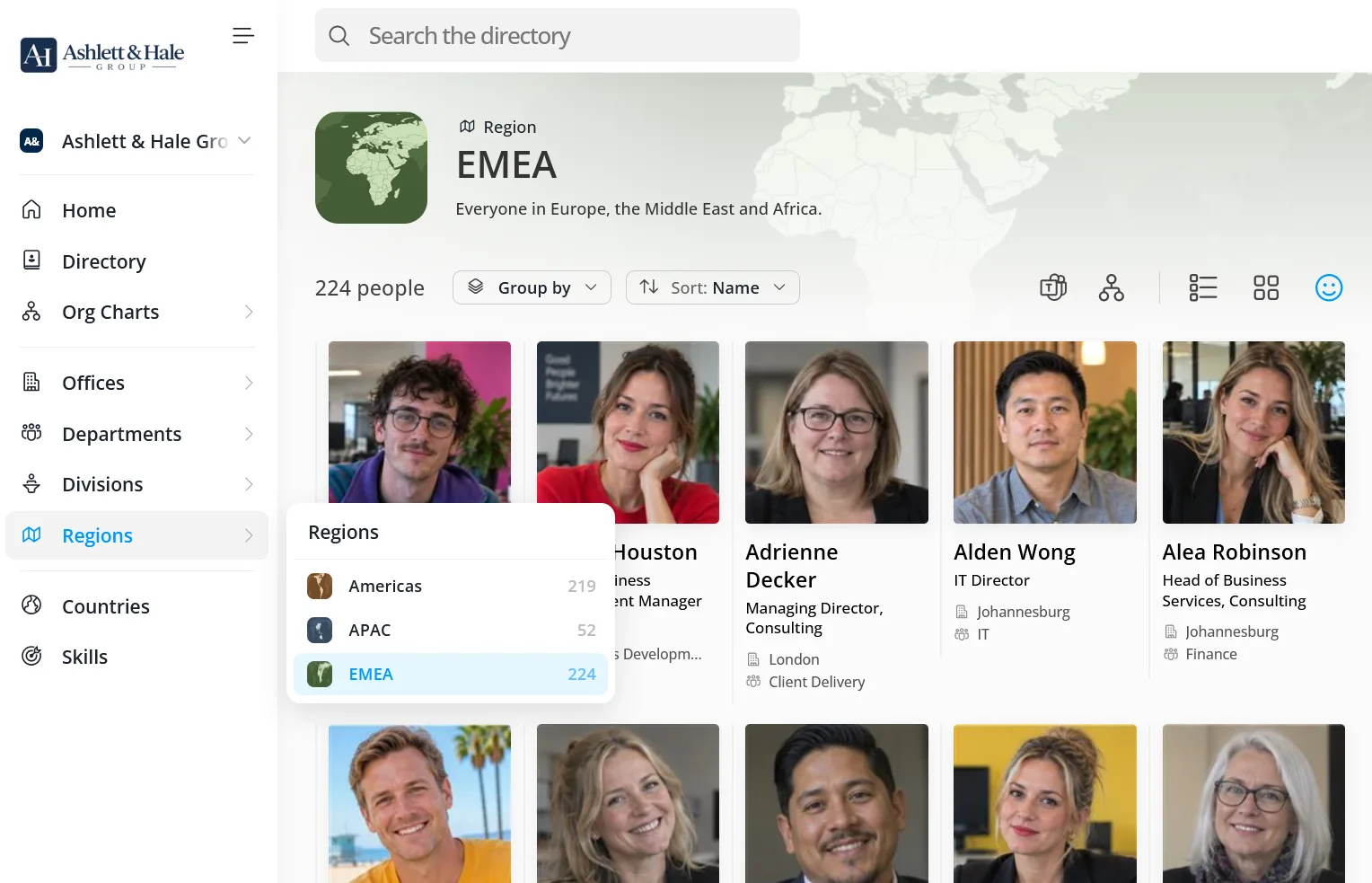
Create your own units, like divisions or regions
Or branches, practice groups and business lines. Each one gets its own page, appears on profiles and works as a filter.
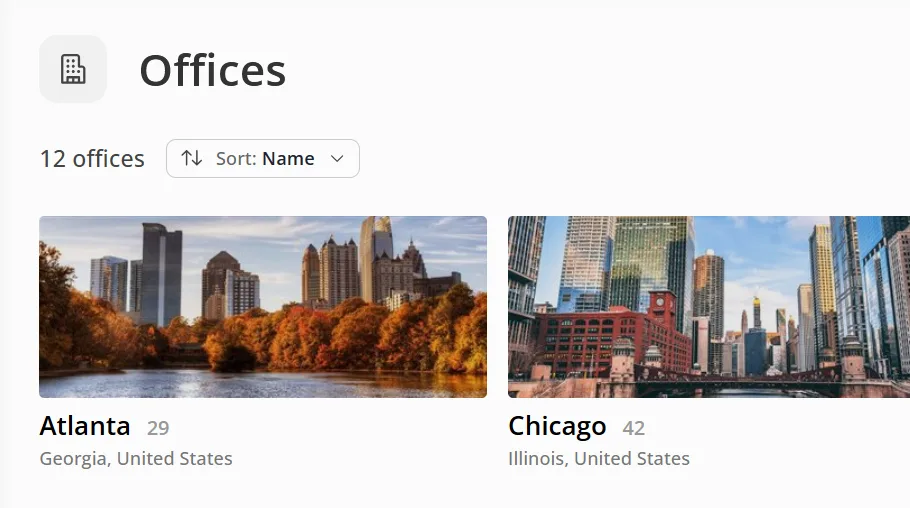
Give every office and department its own page
With an image, key details and everyone who works there.
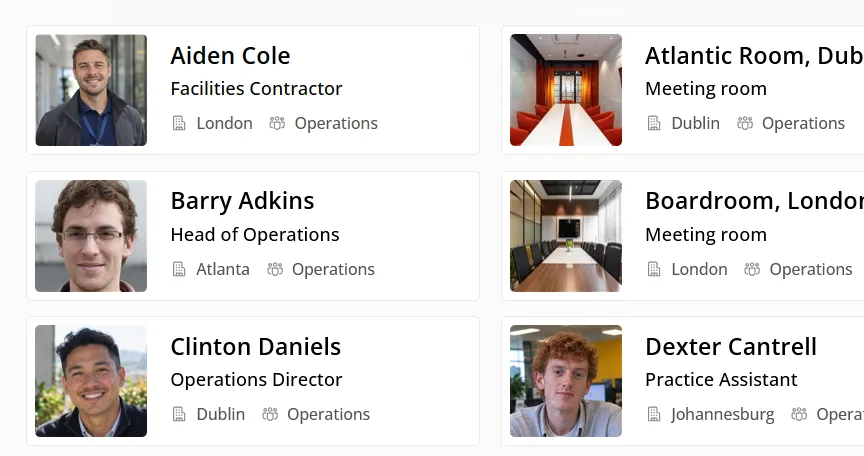
Include everyone, not just Microsoft 365 users
Add contractors, frontline staff and meeting rooms, even without a Microsoft 365 account.
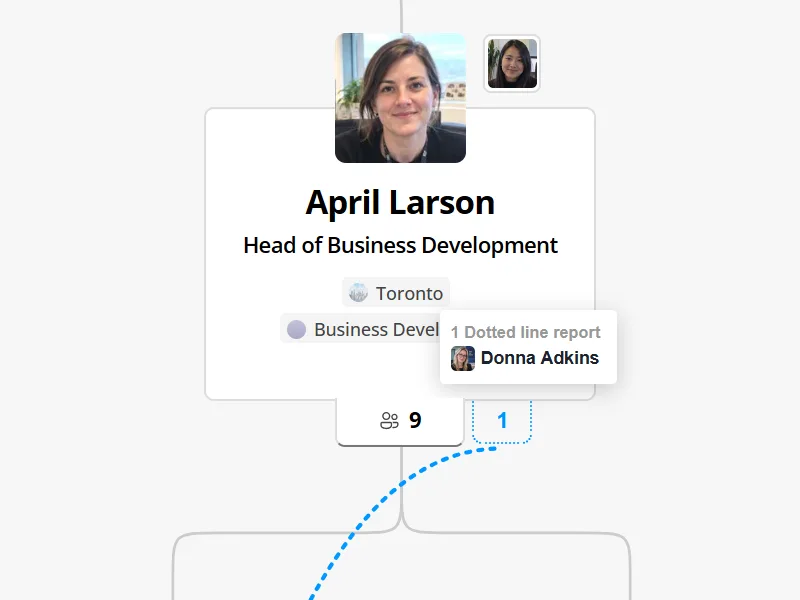
Show more than one reporting line
Add dotted-line managers and assistants alongside each person’s main manager. Both show on profiles and the org chart.
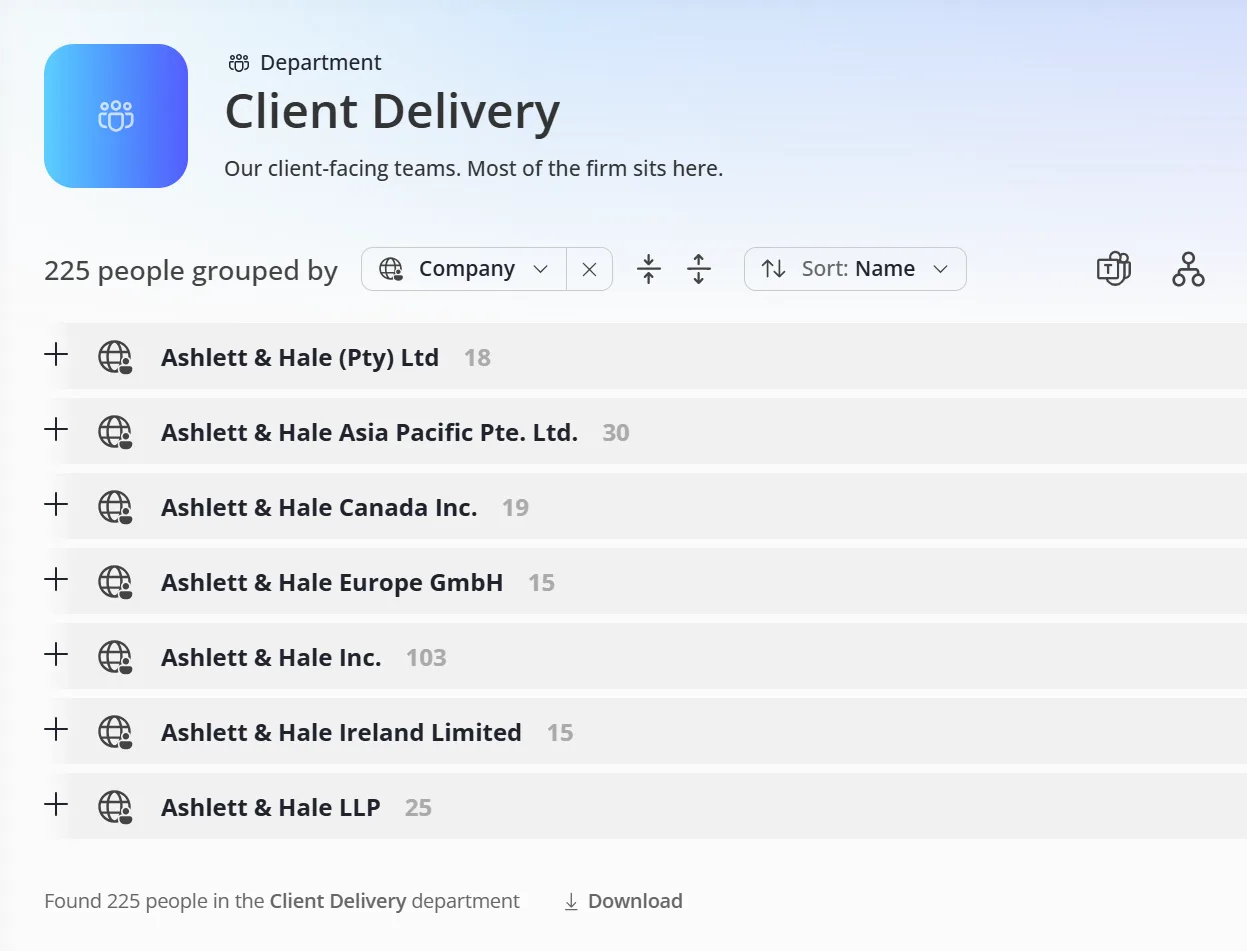
Bring every company into one directory
Group and filter people by company, or connect several Microsoft 365 tenants.

“Our VP of IT decided on OneDirectory due to how easy it was to use, how well it looked, and the cost‑effectiveness.” |
Everyone in your organization, always up to date. As you grow, OneDirectory keeps track of who does what and who to ask.
Employee search
Search everyone in your organization from one box. Profiles open instantly, so you can go from a search to a person to their reporting line without leaving the page.
- Search offices, teams, job titles and skills at once
- Filter by any field, including your custom ones
- Search from Microsoft Teams too

Employee profiles
Every profile shows who someone is, how to reach them, what they know and where they fit, kept in sync with Microsoft 365.
- Jump to anyone’s manager or direct reports in one click
- See assistants and dotted-line managers alongside the main manager
- Add your own fields, like desk location or cost center

Company homepage
See what’s happening across your company the moment you open the directory.
- Welcome new hires with their photo, role and office
- Celebrate upcoming birthdays and work anniversaries
- Pin the links your company uses most, like your intranet or benefits portal

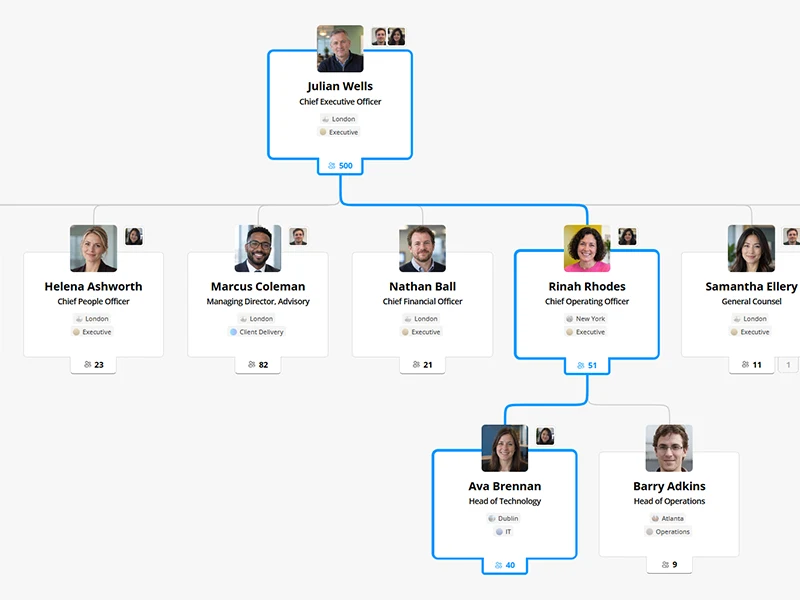
Interactive org chart
Understand how teams fit together with an org chart built from your directory data, with reporting lines that stay up to date as your organization changes.
Explore the org chart
See anyone’s reporting line to the top
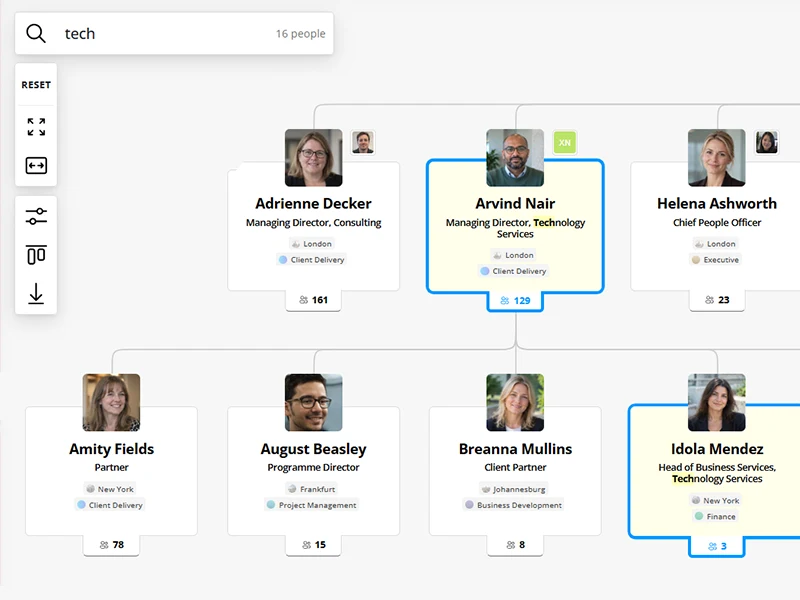
Search the org chart in real time
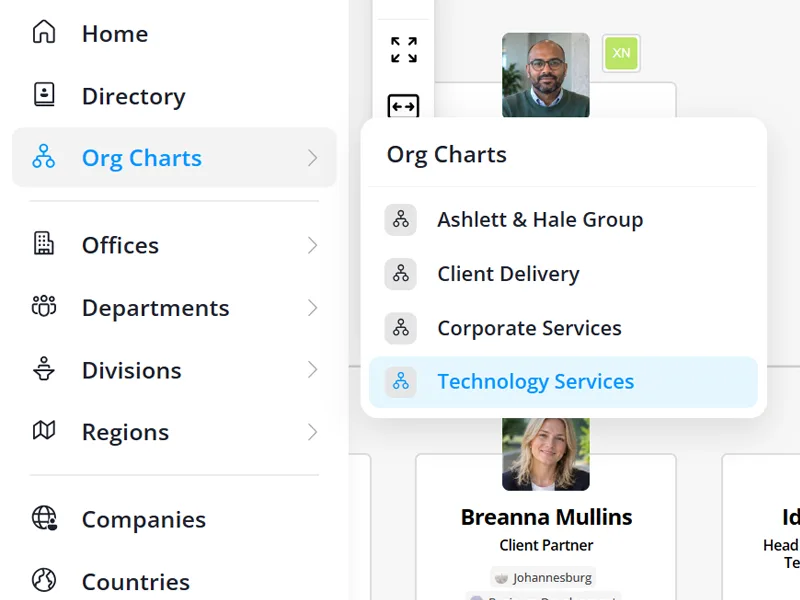
Create multiple org charts for divisions or teams

“Before OneDirectory, our company had a couple of people manually updating the organization chart. OneDirectory has saved hours of manual labor!” |
Works where your people already work. Search the directory and org chart in Microsoft Teams, built on the Microsoft 365 data you already have.
 Microsoft 365
 Microsoft Entra ID
 Microsoft Teams

Start a group chat or schedule a meeting with an entire department, office or team, without leaving Teams.
Built for the IT and HR teams who run it. One console to control who appears, track data quality and extend every profile.

Keep your directory accurate
Fine-tune sync rules, fill in missing data and add the fields your company needs.

Custom fields
Create your own fields, or map them to custom attributes in Microsoft Entra ID.

Profile editing
Let employees update their own profiles, and choose which fields they can edit.

Structure types
Manage offices, departments and your own org units in one place, with coverage for each.

Filtering and sync rules
Hide guest and service accounts, or include only the domains you choose.

Directory completeness
See which fields are missing, like photos or job titles, and close the gaps.

Microsoft 365 sync
Profiles sync automatically from Microsoft Entra ID as people join, move teams or change roles.

“Implementing OneDirectory has transformed our workplace. We’ve reduced IT’s workload and created a more connected environment.” |
Why not just use what you have?
Microsoft 365 finds people.
OneDirectory maps how they fit together.
| OneDirectory | Microsoft 365 people search | SharePoint or intranet directory1 | Spreadsheet | |
|---|---|---|---|---|
| Stays in sync with Entra ID automatically | Yes | Yes | Varies | No |
| Search by skill, office or custom field | Yes | Name and basic fields | Varies | Manual |
| Rich profiles with skills, interests and About me | Yes | Profile card only | Varies | Manual |
| Interactive org chart | Yes | Org Explorer (Enterprise plans)2 | No | No |
| Multiple org charts for divisions or teams | Yes | No | No | No |
| Dotted-line managers and assistants | Yes | No | No | Manual |
| Office, department and custom unit pages | Yes | No | Custom build | No |
| Contractors and meeting rooms without Microsoft 365 accounts | Yes | No | Varies | Manual |
| Several companies or tenants in one directory | Yes | Cross-tenant setup3 | Varies | Manual |
| Profile completeness | Yes | No | No | No |
| Works inside Microsoft Teams | Yes | Yes | Varies | No |
| New hires, birthdays and work anniversaries | Yes | No | Custom build | Manual |
| Chat or meet with a whole team, office or department | Yes | Needs a group | No | No |
| Ready in a day, with nothing to build or maintain | Yes | Yes | No | No |
- 1Depends on how your intranet directory was built and who maintains it.
- 2Org Explorer is available in Outlook for Microsoft 365 Enterprise and EDU plans, and is built from the manager field in Entra ID.
- 3Microsoft 365 can show people from your other tenants once your IT team sets up a multitenant organization and syncs users between tenants. Requires Microsoft Entra ID P1 licenses.
Loved by the people who use it every day
G2 awards for ease of use, implementation and ROI, based on reviews from OneDirectory users.


Customer stories

B&D Industrial enhances employee connections with OneDirectory®
Since 1947, B&D Industrial has been a trusted name in industrial solutions. Learn how they enhanced communication and efficiency using OneDirectory.
Read customer story
Mountain View Hospital improves employee search with OneDirectory
Mountain View Hospital, based in Idaho Falls, implemented OneDirectory to consolidate their employee profile data and highlight team expertise.
Read customer story
Connecting teams across branches at Citizens Alliance Bank
Citizens Alliance Bank uses OneDirectory to unify employee data, reduce manual updates and boost collaboration across multiple branches.
Read customer storyFrequently asked questions
Who is OneDirectory best for?
Microsoft 365 organizations with complex structures: multiple offices, business units or regions, dotted-line reporting, or several companies in one group. Banks, credit unions, law firms, accounting firms, private equity firms, and healthcare and manufacturing companies all use it to keep people search and org charts accurate.
Where does OneDirectory get its employee data?
From Microsoft Entra ID in your own tenant. Names, job titles, departments, offices, photos and reporting lines come from the records your IT team already maintains. OneDirectory syncs them automatically, so the directory reflects changes without anyone re-importing anything. The sync runs every hour.
What makes OneDirectory different from other employee directory software?
Most directories list people. OneDirectory is built around how your company is structured: your own units like divisions or regions, office and department pages, dotted-line managers and assistants, and several companies or Microsoft 365 tenants in one directory. It stays live from Entra ID, works inside Microsoft Teams and gives admins tools for custom fields, sync rules and data quality.
How is OneDirectory different from searching people in Microsoft 365?
Teams and Outlook let you look someone up by name and see a basic profile card. OneDirectory gives you a full employee directory: search by skill, office, department or custom field, rich profiles with dotted-line managers and assistants, pages for every office and department, directory completeness tracking and admin control over who appears.
Does OneDirectory include an org chart?
Yes. A directory tells you who someone is and how to reach them, and an org chart shows how the organization fits together. OneDirectory’s org chart is built from the same data, so you can search for anyone and see where they sit and who they report to. It supports search, zoom, profile previews, multiple layouts and export. You can also create separate org charts for divisions or teams, and every chart updates automatically as your structure changes.
Does OneDirectory work in Microsoft Teams?
Yes. Add the OneDirectory app to Teams so people can search the directory and org chart without switching apps, and chat, call or meet from any profile.
How quickly can we get started?
Straight away. Start a free trial and explore a sample company with no IT setup needed. When you’re ready, connect your Microsoft 365 tenant: most customers have a working directory the same day the first sync completes, with nothing to import and no spreadsheet to prepare. Some teams take extra time to clean up profile data or set up custom fields, so full rollout depends on your internal process.
Can OneDirectory bring several companies or Microsoft 365 tenants into one directory?
Yes. Group and filter people by company, or connect more than one Microsoft 365 tenant to build a single directory across your group. Multi-tenant directories are available on selected plans.
Where is my employee data stored, and is it encrypted?
OneDirectory stores customer data in Microsoft Azure and encrypts it in transit and at rest.
By default, data is hosted in the United States, with other regions available for enterprise customers. We only use the profile data needed to run the service, and your organization stays in control of access and permissions through your identity provider.
Is OneDirectory built for large organizations?
Yes. OneDirectory is built for large, complex organizations and scales from a few hundred employees to tens of thousands of users. Private equity firms, law firms and accounting firms use it to keep people search, employee profiles and org charts fast and accurate across offices.
Is there a mobile version?
Yes. OneDirectory works in any modern mobile browser, so people can search the directory and open profiles on a phone or tablet. There’s no separate iOS or Android app, but OneDirectory also works inside the Microsoft Teams mobile app.
What is employee directory software?
Employee directory software builds a searchable record of everyone in an organization from the data already held in its identity system, and keeps it current automatically. It typically covers profiles, contact details, departments, offices, skills and reporting lines, and replaces the spreadsheets and intranet pages that go stale.